This site is powered by the ProTrainings platform. All content is © 2025, ProTrainings Europe Ltd. All rights reserved.


Pro Trainings is rated 4.6 out of 5 based on 70450 ratings.
This site is powered by the ProTrainings platform. All content is © 2025, ProTrainings Europe Ltd. All rights reserved.
Pro Trainings is rated 4.6 out of 5 based on 70450 ratings.

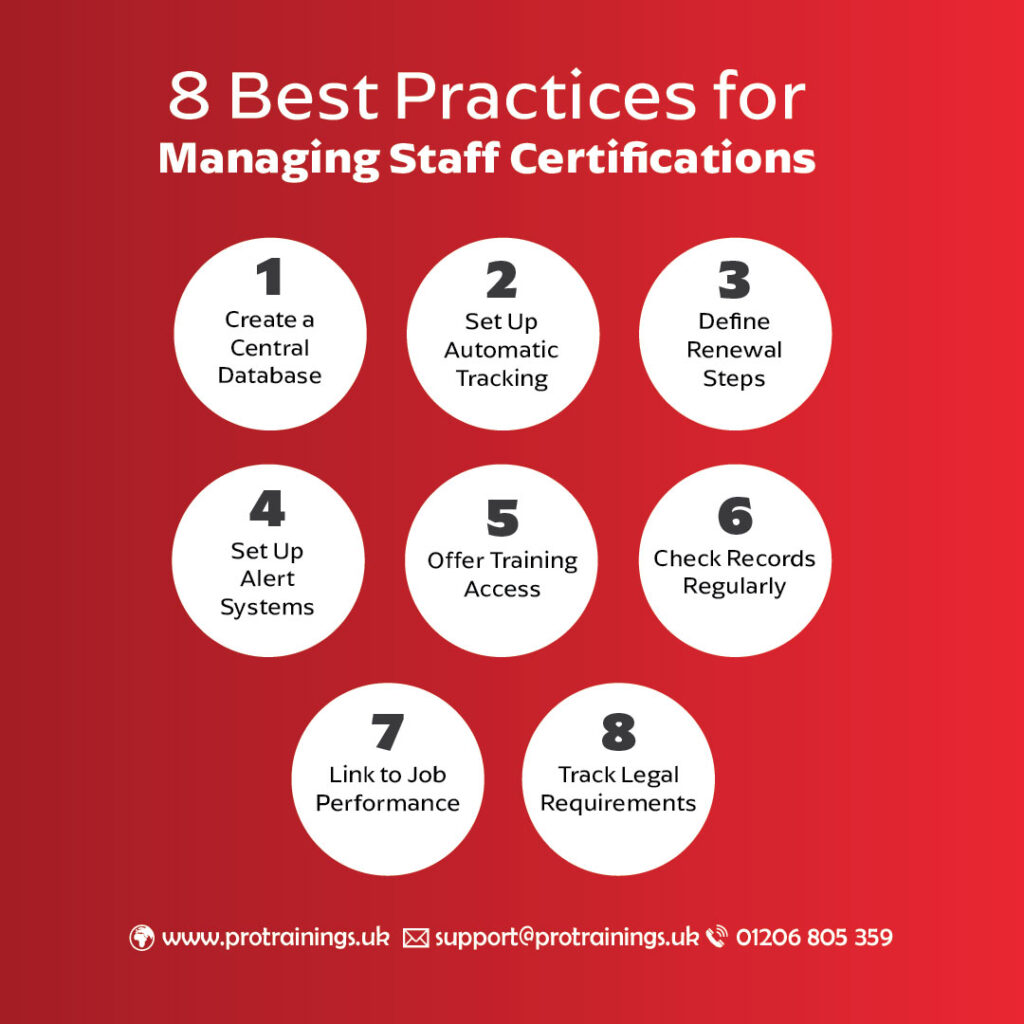
| Practice | Key Benefit |
|---|---|
| Central Database | Simplifies data management and improves accuracy |
| Automatic Tracking | Reduces admin work and ensures timely renewals |
| Renewal Steps | Keeps certifications up-to-date |
| Alert Systems | Prevents missed deadlines |
| Training Access | Ensures compliance through accessible learning |
| Regular Record Checks | Identifies and fixes compliance gaps |
| Link to Job Performance | Boosts employee growth and morale |
| Legal Requirement Tracking | Maintains compliance with industry standards |
By implementing these steps, you can save time, reduce workplace risks, and ensure your organization stays compliant.
Setting up a centralized digital database can help you achieve up to a 95% compliance rate [1]. Here’s what your database needs to track and why it’s crucial for your organization.
Your certification database should include the following details for every employee:
| Component | Details to Include |
|---|---|
| Personal Information | Full name, employee ID, department, role |
| Certification Details | Type, issuing body, certification number |
| Timeline Data | Issue date, expiration date, renewal deadlines |
| Training History | Completed courses, scores, instructor names |
| Verification Status | Current status, validation method, last audit date |
| Compliance Requirements | Industry standards, regulatory requirements |
Digital credentialing platforms, which are expected to grow to $6.32 billion by 2033 [1], often use blockchain technology for secure and tamper-proof verification.
Centralizing your certification data offers several key benefits and can save your organization significant costs. Poor data management can cost businesses up to $14 million annually and $20,000 per sales representative [4].
“Centralized data is a necessary competitive advantage for any organization; it supports an organization’s need for clean, reliable information that is current and accurate.” – Data Ideology [3]
Here are some of the major advantages:
To maximize efficiency, integrate your database with existing HR and learning management systems. Regularly audit your security measures, enforce strict access controls, encrypt stored data, automate backups, and have a solid incident response plan in place [2].
Automated tracking reduces admin tasks and improves accuracy, making it easier to stay on top of certifications.
When choosing certification tracking software, prioritize tools with these features:
| Feature Category | Key Functionality | Business Impact |
|---|---|---|
| Automated Assignments | Automatically assigns training based on roles | Saves time by reducing manual work |
| Real-time Monitoring | Tracks compliance status live | Helps avoid missed certifications |
| Custom Workflows | Automates approval processes | Simplifies verification steps |
| Mobile Access | Accessible across devices | Keeps staff engaged and informed |
| Testing Integration | Offers customizable quizzes | Ensures employees retain knowledge |
Tools like PowerDMS bring these features to life by making certification processes accessible for all staff and offering customizable tests to measure understanding [6]. For the best results, ensure your software integrates well with HR systems to maintain consistent and accurate data.
Connecting your HR systems with certification software helps unify data and eliminates duplicate entries.
Here’s what to consider:
To ease the transition, consider running a pilot program before rolling out the system fully. This allows you to gather feedback and make adjustments while minimizing workflow disruptions.
Having clear renewal steps helps ensure certifications stay up to date and compliant.
| Renewal Phase | Key Actions | Timeline |
|---|---|---|
| Early Planning | Start tracking credits and requirements | Right after certification |
| Documentation | Collect and verify necessary materials | A few months before expiration |
| Submission | Submit renewal applications and fees | At least 30 days before expiration |
| Verification | Confirm renewal and update records | Within 1 week of approval |
“It is your responsibility to submit CPE information and documentation in advance of your certification’s expiration date. To ensure your application is processed in time, please allow 30 days for processing, from the time of completed submission.” – GIAC Certifications [7]
Key tips to follow:
Integrating these steps with automated tracking systems can make the process smoother. Once the procedures are in place, assigning responsibilities ensures everything runs efficiently.
Assigning clear roles ensures accountability and smooth handling of renewals.
Using policy management software can simplify access to renewal procedures and requirements, ensuring everyone understands their role in keeping certifications compliant.
The next section will focus on alert systems to help prevent missed deadlines and lapses in certification.
An effective alert system ensures that staff and managers stay informed about certification renewals. By using multiple notification channels, you can ensure critical updates reach the right people at the right time.
Combining different alert methods helps improve communication and ensures no one misses important deadlines. Here’s a quick breakdown:
| Alert Channel | Primary Use | Key Benefit |
|---|---|---|
| Email Notifications | Detailed renewal instructions | Offers clear information and direct links |
| Slack/Teams Messages | Quick reminders | Reaches staff in their daily workflows |
| Platform Notifications | System-based tracking | Syncs with certification databases seamlessly |
For example, Rippling‘s Workflow Automator simplifies tracking by alerting employees and managers before deadlines approach [11]. You can customize triggers, actions, and recipients to match your organization’s needs.
A well-timed notification schedule gives staff enough time to complete their renewal tasks. DigiCert CertCentral provides a practical example of a notification timeline [9]:
| Days Before Expiration | Action Type | Purpose |
|---|---|---|
| 90 days | Initial Notice | Allows early planning |
| 60 days | Progress Check | Tracks progress on renewals |
| 30 days | Urgent Reminder | Prepares for final submission steps |
| 7 days | Critical Alert | Highlights last chance for renewal |
| 3 days | Emergency Notice | Calls for immediate action |
“Sospes proactively alerts employees, supervisors and training managers when certifications are approaching expiration so scheduling training is easier than ever.” [10]
To make your alert system as effective as possible:
For example, MuleSoft users can automate alerts by creating apps that check certification databases and send notifications based on expiration dates. These alerts can be grouped by urgency and delivered via email, CloudHub, or Slack.
Making certification training easily accessible is key to staying compliant and keeping staff qualifications up to date. Modern approaches often combine online platforms with in-person instruction to create a balanced and effective learning experience.
Choose training providers that meet industry standards while keeping costs manageable. Top providers often offer various delivery methods to suit different learning preferences and schedules. For example, OSHAcademy provides free access to course materials, allowing participants to purchase certificates only after completing the course [13].
Creating effective training materials takes thoughtful planning. A great example is DDI’s collaboration with RWS back in 1970. Their audit uncovered 45 accessibility gaps, leading to major improvements in their digital learning platform [14].
Here’s how to make training more effective:
For instance, OSHAOutreachCourses adds value by offering a free OSHA 10-Hour course when participants purchase their 30-Hour Construction program [12].
Key elements for effective training resources include:
| Element | Implementation | Benefit |
|---|---|---|
| Multimodal Learning | Use video, text, and interactive tools | Supports different learning styles |
| Global Access | Translate materials and respect cultural nuances | Accommodates diverse teams |
| Flexible Pacing | Offer modular content | Allows learners to progress at their own speed |
| Progress Tracking | Use automated systems | Ensures compliance and tracks completion |
“We realized that if we wanted to move ahead with accessibility more quickly, we would need expert help.”
- Verity Creedy, DDI’s Vice President of Product Management [14]
Regularly updating training materials ensures they remain relevant and effective. By integrating these practices with a certification management system, companies can maintain compliance while reducing risks.
Digital tracking systems can achieve impressive results, such as 95% certification compliance and 97% audit readiness [19]. Regularly reviewing records ensures your organization stays on track and avoids compliance issues.
Although there’s no universal legal rule for updating health and safety training, industry standards suggest annual reviews [17]. Some certifications, like first aid, have specific renewal periods – typically every three years [17].
| Review Type | Frequency | Focus Areas |
|---|---|---|
| Monthly Scan | Monthly | Certifications expiring within 30 days |
| Deep Dive | Quarterly | Compliance gaps and certification status |
| Annual Audit | Yearly | Full certification portfolio review |
| Post-Change Review | As needed | Updates after workplace changes |
Modern tools like TalentGuard‘s certification tracking software simplify this process. They provide customizable views for tracking expirations over various timeframes, ranging from 15 days to a year [20]. These insights can drive immediate improvements to your processes.
Use the results of your reviews to improve your certification management. Pairing regular reviews with automated tracking ensures your organization stays compliant.
“TalentGuard’s Certification Tracking software has significantly improved our certification management process. The real-time alerts and easy-to-use reporting tools have made staying compliant effortless and efficient” [19].
“Providing health & safety training once is simply not enough. With regular updates to legislation and changes within your business, refreshers are certainly important to keep your employee’s knowledge and understanding up to date” [17].
Here are three key actions to take based on your review findings:
Connecting certifications to job roles can boost both employee performance and career progression. Below, we break down how to align certifications with job responsibilities and highlight the importance of recognizing compliance.
Align certifications with specific job roles to evaluate skills and identify leadership potential.
| Certification Level | Job Impact | Performance Indicators |
|---|---|---|
| Required | Core duties | Safety compliance, basic skills |
| Advanced | Higher capabilities | Process improvements, leadership |
| Specialized | Expert-level expertise | Problem-solving, innovation |
“Certifications are proof of your skill level. When you get a degree, say in accounting, it only proves that you have taken the courses. When you achieve a certification you have demonstrated your knowledge and expertise to a standardized level.”
Here’s how to strengthen the link between certifications and job performance:
Recognizing certification achievements not only boosts morale but also drives better results. According to Deloitte, businesses that prioritize frequent recognition are 1.7 times more likely to excel [26].
“A strategic and well-regarded certification can help increase the chances of a promotion, a raise, or landing that more fulfilling, better-paying job” [24].
To effectively reward compliance:
Research reveals that 37% of employees feel that personal recognition motivates them to deliver better work [27].
“There is nothing more powerful than showing the world (and reminding yourself) that you are a champion of lifelong professional self-development. Keep on learning, keep on growing – it’s the only way to stay relevant in a highly evolving, topsy-turvy world.” – Dawid Wiacek [24]
Staying compliant with certification regulations involves consistent monitoring and detailed reporting. According to recent data, 43% of Chief Ethics and Compliance Officers consider keeping up with new rules their biggest challenge [31].
Keeping track of regulatory updates demands a structured plan to remain aligned with certification standards. Organizations often rely on these key practices:
The Health and Safety Executive (HSE) emphasizes the importance of regularly assessing safety programs to ensure they meet current standards [28].
“Whenever these assessments identify opportunities to improve the programme, employers, managers, and supervisors – in coordination with workers – should make adjustments and monitor how well the programme performs as a result.” – Health and Safety Executive (HSE) [28]
By consistently monitoring changes, organizations can produce timely and accurate compliance reports.
Automation is becoming a key tool in compliance tracking, with 45% of compliance officers prioritizing automated processes [31]. Platforms like SafetyCulture, rated 4.6/5 stars on Capterra, assist organizations in keeping certification records accurate and up-to-date [32].
Here are some essential elements of effective compliance reporting:
“Figuring out what’s involved in maintaining a particular certification will take some research on your part. It will also require some scheduling effort to make sure you meet deadlines associated with that credential.” – Ed Tittel [29]
Specialized software solutions can simplify this process by offering real-time alerts, automated tracking, and detailed compliance reporting.
Keeping track of staff certifications is no small task, but efficient systems can make a big difference. In 2022, over 2.8 million nonfatal workplace injuries and illnesses were reported in the U.S. [34]. These numbers emphasize the need for taking proactive steps.
“TalentGuard’s Certification Tracking software has significantly improved our certification management process. The real-time alerts and easy-to-use reporting tools have made staying compliant effortless and efficient” [19].
Here are three key areas to focus on:
Beyond meeting regulations, using reliable certification tracking systems can lead to safer workplaces and fewer lost workdays. For example, in 2020 alone, workplace injuries resulted in 597,000 lost workdays [35].
Start by setting up a centralized database for certifications and automating reminders. Combine this with regular audits and verification processes to stay on top of industry standards [36]. This approach not only protects employees but also strengthens the organization’s ability to adapt and thrive.